Astro API Usage Guide
Astro API Usage Guide
Setup and API behavior reference for the Astro loyalty integration in SD Desktop
Document purpose
This guide explains how the Astro API integration is used in SD Desktop. It is intended as a usage reference for configuration, authentication, customer sync, sales transactions, frequent buyer activity, offers, points, and redemptions.
1. Integration overview
When Astro is enabled, SD Desktop communicates with Astro Loyalty for loyalty-related customer and transaction workflows. Astro is treated as the source of truth for Astro loyalty members. SD keeps local customer and transaction records, but Astro-facing customer changes are sent to Astro first where required.
The integration is separate from DataCandy and SD local loyalty points. Astro can be enabled independently and should not depend on DataCandy being active.
2. Required configuration
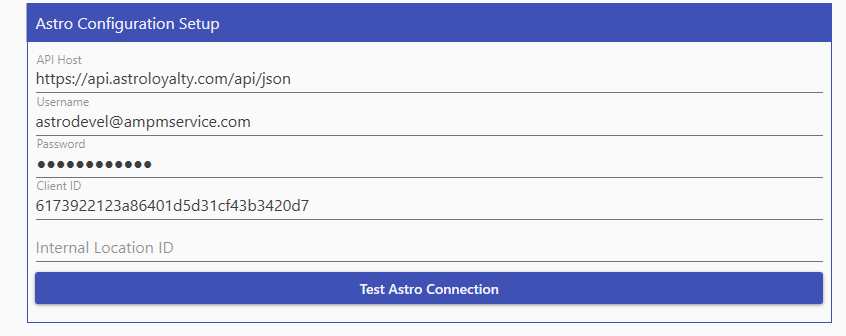
Configure Astro from System Parameters 2 before using the integration.
AstroApiHost: Base Astro API URL. Default value is https://api.astroloyalty.com/api/json
AstroUsername: API username provided by Astro.
AstroPassword: API password provided by Astro. This value is stored encrypted by SD.
AstroClientID: Client ID provided by Astro. Paste it exactly and avoid extra spaces.
AstroInternalLocationID: Astro location identifier when required by the customer's Astro setup.
AstroLoyaltyIntegrationType: Controls whether Astro is active for the loyalty integration.
3. Authentication
The integration requests an access token before calling authenticated Astro endpoints.
Token endpoint: {AstroApiHost}/token/
Content type: application/x-www-form-urlencoded
Token fields: username, password, grant_type=password, client_id
The returned access_token is cached and reused until it is close to expiration. If Astro does not return an access token, verify the Client ID, username, password, and API host.
4. Request format
Astro API payloads must be sent through the jsonData form variable for API calls after authentication.
Content type: application/x-www-form-urlencoded
Authorization: Bearer {access_token}
Form field: jsonData={serialized JSON payload}
Example payload for customerStatus: jsonData={"customerID":123,"completed_cards":true}
5. Customer usage flow
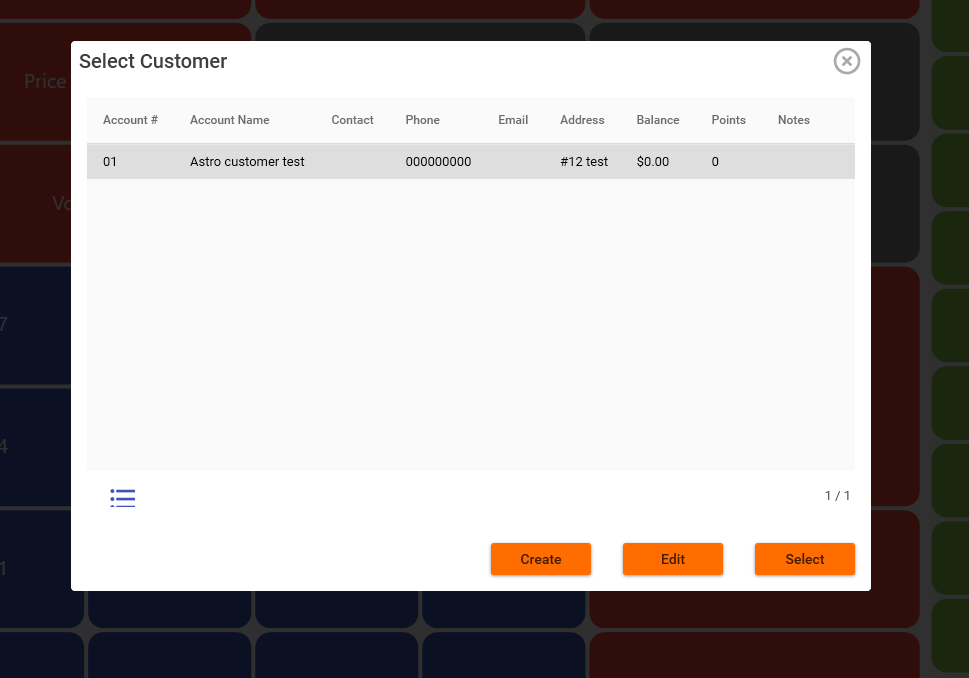
When an Astro customer is selected or saved, SD uses Astro endpoints to keep the Astro account aligned with the local POS flow.
customerStatus: Checks whether the customer already exists in Astro.
searchCustomer: Searches by supported identifiers such as email and phone. searchCustomerByName is not used because multiple people can share the same name.
addCustomer: Creates the customer in Astro when the customer does not already exist.
updateCustomer: Updates the Astro customer before saving local changes when Astro is enabled.
If Astro is enabled and the Astro customer sync fails during customer save, the local save should not continue as if Astro confirmed the change.
6. Sale and frequent buyer usage flow
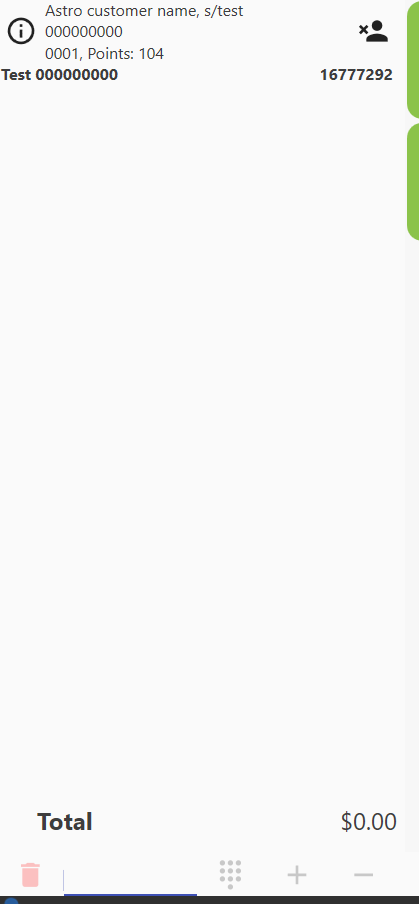
For a sale with an Astro customer, SD sends transaction information to Astro after the sale is completed and posts eligible items for frequent buyer tracking.
addTransactionBatch: Sends eligible purchase items in a batch after sale completion.
addPointsByDollar: Adds points based on the sale amount when the Astro setup supports dollar-based points.
customerPointsStatus: Reads the customer's current Astro points information for display and redemption flow.
7. Offers and rewards
Offers and rewards depend on the customer's Astro configuration and active SKU/program setup.
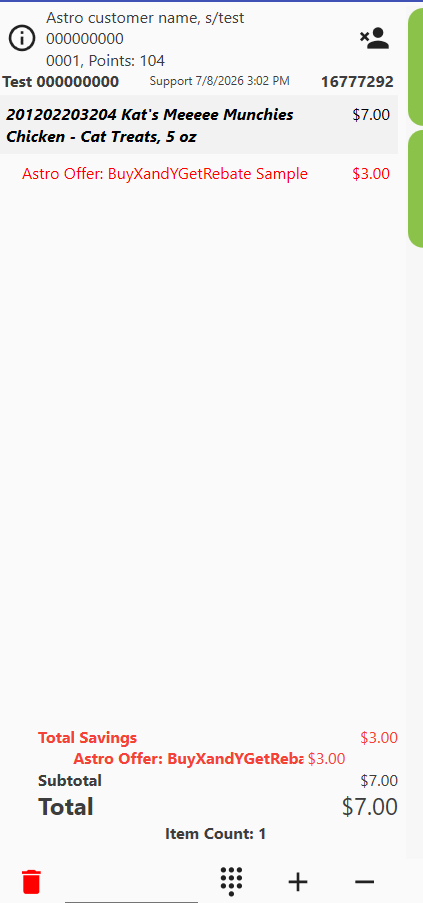
At subtotal, SD clears existing Astro discounts for the transaction and recalculates eligible Astro rewards/offers.
checkRedemptionEligibility: Checks whether an item is eligible for an Astro reward redemption.
addOfferTransaction: Sends the item code, quantity, customer, and transaction information for Astro offer processing.
removeOfferTransaction: Removes a previous Astro offer transaction before recalculating when needed.
If Astro returns No Item Found, the item code/UPC is not configured in Astro for the active offer or frequent buyer program.
8. Points and redemptions
Astro points redemption is handled through Astro and should not use SD local points redemption.
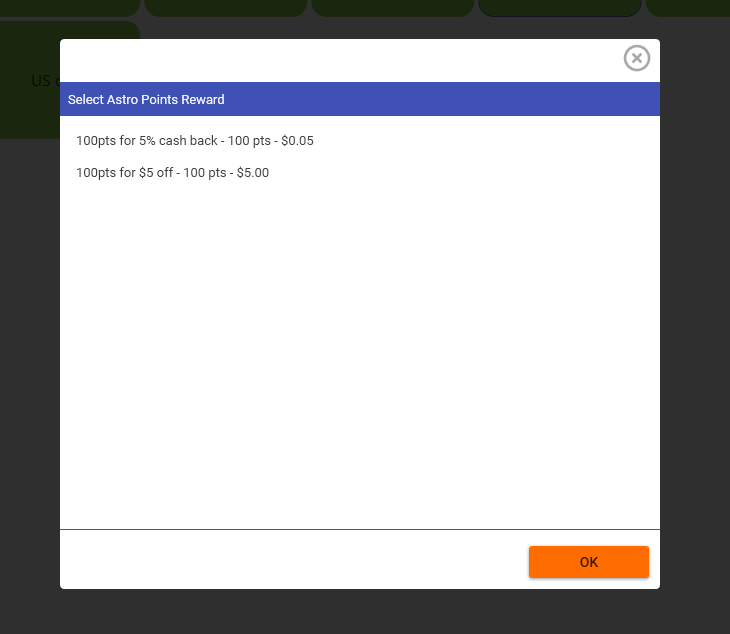
customerPointsStatus is used to retrieve available Astro point rewards.
redeemPoints is used to deduct the selected Astro points reward from Astro.
Endpoint: {AstroApiHost}/redeemPoints/
Payload: jsonData={"customerID":123,"astro_points_reward_id":456}
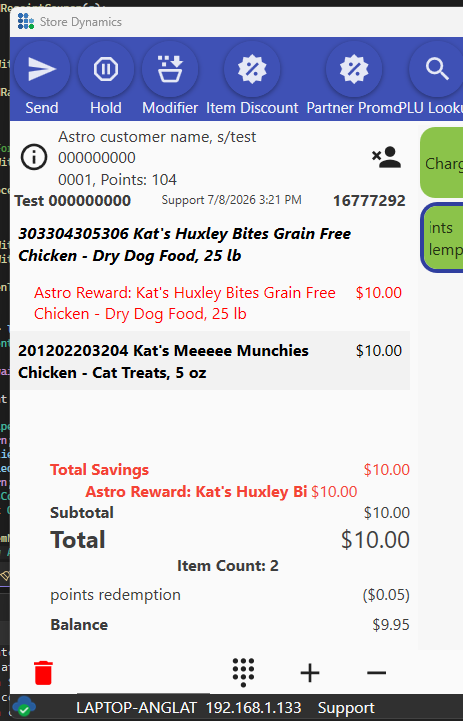
If redeemPoints succeeds, SD counts the Astro redemption tender and prints it as Astro Points Redemption. If redeemPoints fails, the tender should not be counted as paid.
9. Error handling guide
Invalid Client ID: Verify the AstroClientID value, hidden spaces, and environment/account match.
Token request did not return an access token: Check the Astro response in the output/logs and verify credentials.
Incomplete Request: Confirm the required fields and ensure the request payload is being sent through jsonData.
No Customer Found: The customer was not found in Astro. SD may continue with searchCustomer or addCustomer depending on the flow.
No Item Found: The UPC/item code is not configured in Astro for the active offer or frequent buyer program.
No Astro point rewards are available: The customer does not currently have an available Astro points reward to redeem.
10. Operational notes
Do not include real passwords or client secrets in screenshots, tickets, or shared documentation.
Use the customer's real Astro SKU lists and offer setup when reviewing offer behavior.
Astro should remain independent from DataCandy and from SD local loyalty points.
When troubleshooting, capture the customer identifier, UPC/item code, transaction number, Astro endpoint, Astro status code, and Astro status message.
11. Reporting
Astro-related sales, rewards, offers, points activity, and redemptions can be reviewed through the standard SD reporting tools.
Astro rewards and offers are recorded on the transaction as item discounts. These discounts use the Astro discount reporting type, so they can be identified in discount or transaction detail reports by looking for Astro reward/offer discount lines.
To review Astro sales and discounts:
-
Open Back Office.
-
Go to Reports.
-
Run the sales or transaction detail report for the required date range.
-
Review transactions that include Astro customers or Astro discount lines.
-
For discount reporting, look for discounts with names such as Astro Rewards or Astro Offers.
-
The discount amount shown on the report represents the Astro reward or offer value applied to the sale.
Astro points redemptions are recorded as a tender/payment line instead of a local SD points discount. These can be reviewed in tender or payment reports.
To review Astro points redemption activity:
-
Open Back Office.
-
Go to Reports.
-
Run the tender/payment report for the required date range.
-
Look for tender lines named Astro Points Redemption or points redemption.
-
The tender amount represents the Astro points value redeemed on the transaction.
For transaction-level review, open the transaction detail and confirm:
Customer: The Astro customer assigned to the sale.
Items: The items purchased in the transaction.
Astro rewards/offers: Any Astro discount lines applied at subtotal.
Astro points redemption: Any Astro points redemption tender applied as payment.
Total savings: The total Astro reward or offer discount amount.
Balance/payment: The remaining balance after Astro points redemption.
Recommended reports:
Sales report: Use this to review total sales for transactions that include Astro activity.
Transaction detail report: Use this to confirm the customer, items, discounts, and tenders on a specific transaction.
Discount report: Use this to review Astro Rewards and Astro Offers discount amounts.
Tender/payment report: Use this to review Astro Points Redemption tender amounts.
Reporting notes:
Astro rewards and offers should be reviewed as discounts.
Astro points redemptions should be reviewed as tenders/payments.
Astro points redemption should not be reported as SD local loyalty points.
If an Astro reward or redemption is missing from reporting, verify the original transaction detail first and confirm whether the Astro discount or tender was applied successfully during the sale.
Tag: